



.

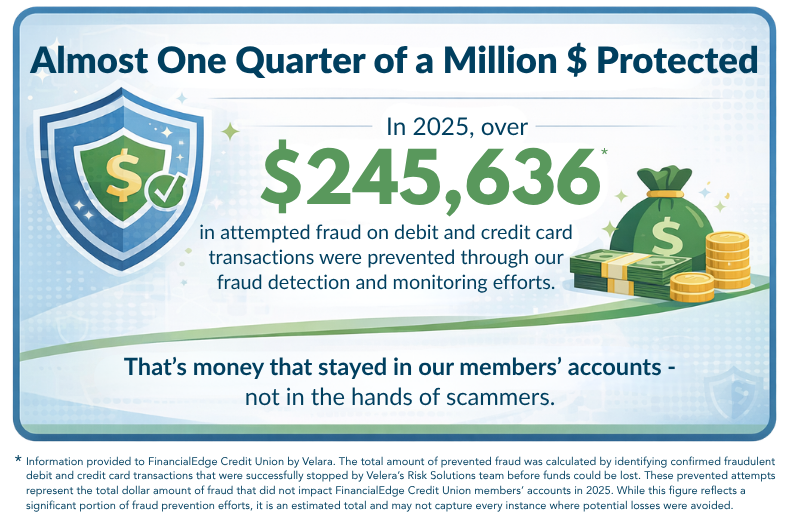
Your security is our priority. As fraud attempts continue to rise, it’s important to stay aware of the latest scams targeting credit union members. Here, you’ll find up-to-date information on common fraud tactics, warning signs to watch for, and practical tips to help keep your information and accounts safe.
As a reminder: FinancialEdge CU will NEVER call and ask you to provide sensitive account information, like your full debit card number, Social Security Number, PIN, or online banking credentials, especially through an unsolicited call, email, text, or message on social media.
 |
Latest Scam
Fraud Alert: Beware of Spoofing Calls
We've recently been made aware of scam calls where fraudsters are spoofing FinancialEdge Credit Union's phone number and claiming to be from our Fraud Department.
Caller ID can be manipulated, so even if the call appears to come from FinancialEdge, it may not actually be us.
Please remember:
- Never share your online banking password or Multi-Factor Authentication (MFA) verification codes.
- Never provide your debit card PIN or other sensitive account information over the phone.
- If a caller pressures you to act immediately, hang up.
If you're ever unsure whether a call is legitimate, end the call and contact us directly using the phone number listed on our website or the back of your debit/credit card.
Your security is our top priority. Staying cautious and protecting your personal information is one of the best ways to prevent fraud.
How to spot the top scams that started on social media
If you’re on social media, you know posts from friends and family might not be the only ones on your newsfeed — scammers are there too. FTC data shows that losses to scams on social media have been increasing dramatically since 2020 — people reported losing $2.1 billion to these scams in 2025 alone. The FTC’s new data spotlight brings to light some of the insights about what scams people experience on social media. Keep reading to learn how to scroll past the scams.
Here’s what we know about the top scams that started on apps like Facebook, WhatsApp, or Instagram:
- Shopping scams were the most reported scam on social media. Scammers post ads offering high-priced items for cheap. If you click, you might end up on a site that’s impersonating a well-known brand. Most people said their items never arrived, while others said what came in the mail was either a knock off or simply not what they ordered.
- More than half of the reported losses came from investment scams. Scammers use ads and testimonials offering to teach you a fool-proof way to beat the stock market. But investing always comes with risk.
- Nearly 60% of people who reported losing money to a romance scam in 2025 said it started on social media. Scammers use what’s in your profile to build a connection only to later invent a problem that requires you to send them money. And some scammers mix love with money by casually offering investment advice to draw you onto a fake investment platform.
To avoid scams on social media:
- Limit who can see your posts and contacts on social media. Visit your privacy settings to set some restrictions so scammers have less to work with.
- Never let someone you met on social media direct your investment decisions. Instead, learn more about spotting investment scams.
- Before you buy, check out the company. Search online for its name plus “scam” or “complaint.”
Learn more ways to spot and avoid scams at ftc.gov/scams. If you spot a scam, report it to the FTC at ReportFraud.ftc.gov.
Copyright: Article provided by Federal Trade Commission Consumer Advice. Written by BCP Staff, April 27, 2026. To view the article, go to: How to spot the top scams that started on social media | Consumer Advice
CLICK HERE FOR MORE OF THE LATEST SCAMS
Red Flag Checklist
|
Below are a few common red flags to look out for when trying to decide if the email, text message, or phone call you received is valid or a SCAM!
|
.png)
- Carefully check the sender's email address.
- Hover over links with your mouse to reveal the full address before clicking, and to help detect any inconsistencies or names/entities being used.
- Watch for poor language, grammatical mistakes, or unprofessional designs.
- Be cautious of requests or instructions that:
- Create a sense of urgency; this can be a warning sign
- Pressure you to send money
- Instruct you to purchase gift cards or codes, wire transfer, or deliver mail cash as a form of payment (especially to a bitcoin or crypto kiosk machine)
- Instruct you to cash a check for a stranger
- Instruct you to deposit a check that overpays for something you're selling and then send the difference elsewhere
- Ask for your personal identifiable information
- If you're uncertain, discard the email and verify its authenticity by contacting the company or individual through a different method. Do not use any email addresses or phone numbers provided in the email when verifying.
Types of Scams
Scammers use a variety of tactics to try to gain access to your personal and financial information—and they are constantly coming up with new ways to deceive people and make their messages appear as real as possible. While their methods may differ, they often rely on urgency, fear, or trust to pressure you into acting quickly. Understanding the most common types of scams can help you recognize suspicious activity and avoid becoming a victim.
.png) |
Stolen or Altered Check Fraud
What it is:
A fraudster steals a check (from the mail, a drop box, etc.), then alters it by "washing" it (removing the ink and changing details such as who it's paid to, the amount, and the date). By the time the check gets cashed, it could look very different from the check you originally wrote. These stolen checks could also be used to obtain account information and withdraw funds.
What it looks like:
- Checks you originally wrote are now cashed from your account for a different dollar amount and from a different payee. Basically, not at all the same check you originally wrote.
How to protect yourself:
- Use secure mailboxes or drop checks inside the post office
- Monitor your account balances and transactions regularly
- Consider electronic payments when possible
- Set up alerts for transactions over a certain dollar amount
- Review your account statements regularly
- Double-check your check images within online/mobile banking and compare them to your checkbook's duplicate or carbon copy
Overcharging Scam
What it is:
A scammer takes advantage of a transaction by charging more than agreed upon or adding unauthorized charges for goods or services.
What it looks like:
- Unexpected or inflated charges after a transaction
- Vague or unclear pricing for services
- Pressure to pay quickly without reviewing details
How to protect yourself:
- Review all charges carefully before making payment
- Work with reputable businesses and individuals
- Ask for clear, written estimates or invoices
- Monitor your account for unauthorized transactions
Relationship Scam
What it is:
A scammer builds a fake relationship - often romantic or friendly - over time to gain trust and eventually request money.
What it looks like:
- Someone you’ve never met asks for financial help
- Quick emotional connection or intense communication
- Excuses for why they cannot meet in person
How to protect yourself:
- Never send money to someone you haven’t met in person
- Be cautious of online-only relationships
- Avoid sharing personal or financial details
- Talk to a trusted friend or family member if unsure
Lottery Scam
What it is:
A scammer claims you’ve won a prize or lottery, but requires payment or personal information to “claim” it.
What it looks like:
- Notifications that you’ve won a contest you didn’t enter
- Requests for fees, taxes, or shipping costs upfront
- Requests for account or card information
How to protect yourself:
- Remember: you should never have to pay to receive a prize
- Do not share personal or financial information
- Be skeptical of unexpected winnings
- Verify the legitimacy of any contest or organization
Relative in Trouble Scam
What it is:
A scammer pretends to be a family member or claims a loved one is in trouble, often involving an emergency or legal issue, and urgently asks for money.
What it looks like:
- Claims that a loved one has been arrested or is in danger
- Urgent requests to wire money or send funds quickly
- Requests to keep the situation confidential
How to protect yourself:
- Pause and verify the situation by contacting your loved one directly
- Do not send money based on a single call or message
- Ask questions only your family member would know
- Be cautious of requests for secrecy
IRS Scam
What it is:
A scammer poses as an IRS agent and claims you owe unpaid taxes. They pressure you to make an immediate payment through non-traditional methods.
What it looks like:
- Threats of arrest or legal action if payment is not made immediately
- Requests for payment via wire transfer, gift cards, or money orders
- Calls, emails, or texts claiming to be from the IRS
How to protect yourself:
- Know that the IRS will not demand immediate payment or request gift cards
- Do not respond to unsolicited requests for payment
- Verify any tax-related communication through official IRS channels
- Hang up and contact the IRS directly if unsure
Computer Virus Scam (Tech Support Scam)
What it is:
A scammer pretends to be a tech support representative and claims there is a problem with your computer or account. They may ask for remote access or direct you to log into your accounts, allowing them to steal personal information or funds.
What it looks like:
- Unsolicited calls or pop-ups warning you that your device is infected
- Requests for remote access to your computer
- Instructions to log into your accounts while they are “helping”
How to protect yourself:
- Do not give remote access to your computer to anyone you don’t know
- Avoid clicking on suspicious pop-ups or links
- Contact the company directly using official contact information
- Never log into your accounts while someone else is guiding you
Credit Union Impersonation Scam
A scammer will do everything they can to appear like a real credit union employee attempting to assist you with your account.
Typical Phishing and Smishing scenario:
Posing as a credit union fraud department employee, the scammer sends a spoofed email or text message to a member alerting them to suspicious debit card activity. Instructions urge the member to reply to the original message with account details, card numbers, CV2 codes, PINs, or other online account credentials. Phishing and Smishing give the scammer valuable data they can use to make unauthorized charges or access the member’s account.
Typical Vishing Scenario:
Posing as a credit union representative, the scammer contacts the member using a spoofed phone number. The caller claims they must discuss an important matter, but they must first confirm the member’s identity. The scammer is already on the credit union’s online banking website and informs the member they must provide the PIN sent to the member’s phone or answer security questions. Since the caller says they’re from the credit union and the number appears to confirm it, the member doesn’t hesitate to provide the requested information.
Vishing allows the scammer to use the information provided by the member to complete the login. They then proceed to lock the member out of their account by changing the online banking password. The fraudster then transfers funds from the member’s account to their own temporary account before vanishing without a trace. The caller might even encourage the member to transfer funds to an external account claiming that the payment will be applied to a specific credit union loan.
How to Protect Yourself from Credit Union Impersonation Scams
- Never share private information via SMS text message. Legitimate attempts to validate credit or debit card activity only requires a simple response (YES or NO) via text.
- Do not click on hyperlinked phone numbers sent via SMS text or on links inside emails.
- Pause before providing personal data via voice calls you did not initiate, even if the caller ID reads “FinancialEdge Credit Union” or appears to be our phone number. Hang up and contact us directly.
If you suspect a call might be fraudulent, please hang up and contact us directly at 989-892-6088. If you believe you have fallen victim to fraud or notice any unauthorized transactions on your account, please inform us right away so we can take appropriate action.
Debit and Credit Card Fraud
What it is:
Unauthorized use of your debit or credit card information through skimmers, hacked websites, or phishing.
- Skimmers are devices that scammers can install on payment terminals such as ATMs, vending machines, or gas pumps (just to name a few) that can collect the card data from the magstripe when the card is being used.
- Skimmers can also be a handheld device or attached to a scammer's mobile phone, allowing the scammer to collect information from a card that is in your purse, wallet, or pocket.
- Both of these skimming techniques allow the scammer to collect the card information from the card magstripe and then use the stolen card information to clone cards and make unauthorized purchases from your account.
What it looks like:
- Purchases from your account that you did not authorize
- Card transactions declined due to suspicious activity
How to protect yourself:
- Turn on transaction alerts through the mobile app Card Controls
- Place your cards in wallets, purses, or card sleeves with RFID protection - this can stop scammers from being able to use skimmers to retrieve your card information
- Review your account transactions and balances regularly
- Immediately report lost/stolen cards and fraudulent transactions to us
Credential Theft Fraud
What it is:
Scammers will trick you into giving out your online/mobile banking login credentials or verification codes.
What it looks like:
- Scammers can spoof a credit union's phone number (so the phone call appears to be coming from the credit union when it's not), and they will ask you to "verify" your account details or online banking/mobile login information.
- Phone calls or emails coming from unknown numbers/emails requesting your information to "stop fraud"
- Fake login pages
How to protect yourself:
- Never share your login information or one-time codes
- Only login through official apps or websites
- Remember: We will NEVER ask you for this information
Debit/Credit Point-of-Sale Fraud
What it is:
Fraud that can occur when your debit or credit card is used at a store or terminal, often due to skimming, compromised systems, or a scammer watching you enter your PIN.
What it looks like:
- Charges from places you've never visited in-person or online
- Multiple small "test" transactions trying to verify your account
How to protect yourself:
- Use chip or contactless payment when possible
- Cover your hand when typing in your PIN
- Monitor transactions and set up alerts through the mobile app Card Controls
- Turn cards on/off as needed through the mobile app Card Controls
- Report lost/stolen cards or fraudulent transactions immediately
Unauthorized ACH Transactions
What it is:
Unauthorized electronic withdrawals or deposits from your account using your routing and account number.
What it looks like:
- Unknown companies pulling funds out of your account
- Recurring withdrawals you didn't approve
- A scammer asking for your banking details to issue you a refund, prize money, or from a fake job.
How to protect yourself:
- Review your account deposits and withdrawals on a regular basis
- Report unauthorized transactions immediately to us
- Do not give out your account information
- Set up alerts for transactions through Card Controls
Mobile Deposit Fraud
What it is:
A scam involving fake or altered checks deposited through mobile banking.
What it looks like:
- Someone asks you to deposit a check and send them part of the funds
- Duplicate deposits of the same check
How to protect yourself:
- Only deposit checks from trusted sources
- Never share check images
- Don't send money from a deposit you're unsure about
- Don't deposit checks on behalf of someone else
Cashier's Check Fraud
What it is:
Scammers have a couple of ways to use cashier's checks for fraud. One way is to send you a check that looks official, but it's actually fake. The scammer will then ask you to deposit the check, and send part of the money back. Another way scammers have used cashier's checks for fraud is by intercepting them in the mail, or asking you to send one to a fake business or individual.
What it looks like:
- Overpayment scams ("Keep some, send the rest back")
- Urgent requests tied to home purchases, invoices, or emergencies
How to protect yourself:
- Be cautious of unexpected checks
- If it feels too good to be true, it probably is
- Only pay people you know and trust
- Deliver checks in person or by tracked/certified mail
Wire Transfer Fraud
What it is:
Scammers often pose as someone they feel you will trust. They're known to present themselves as law enforcement, attorneys, a government office, a business or financial institution they know you are using, sometimes a friend you've made online, or a family member they're impersonating, and many other examples. They use these tactics to try and trick you into wiring money, and once you wire it, it's gone!
What it looks like:
- Last-minute “updated wiring instructions”
- You've been told you're paying a debt owed, but the funds are going to a person, an entity that you do not know, or the wired funds are leaving the United States.
- Urgent requests such as: back taxes or a ticket you owe that you were not aware of, money to help someone you or they know with medical bills, travel, or to get a relative out of jail. If they've befriended you, it may be for a home purchase, or other more personal emergencies.
How to protect yourself:
- Never wire funds to someone you do not know at the request of another.
- Answer financial institution wire questions truthfully; these are in place to protect you and your funds.
- Always verify wiring instructions using a trusted phone number
- Verify who you're sending money to
- Be cautious of last-minute changes
- Remember: wire transfers are usually irreversible
Artificial Intelligence Impersonation Scam
What it is:
Scammers use artificial intelligence (AI) to mimic the voice, image, or writing style of someone you trust. They use this to convince you that a request is legitimate.
What it looks like:
- Calls or messages that sound like a loved one or trusted contact
- Urgent requests for money due to an “emergency”
- Requests to send funds via wire transfer, gift cards, or cryptocurrency
How to protect yourself:
- Verify requests by contacting the person directly using a known phone number
- Be cautious of urgent or unusual requests for money
- Do not rely solely on voice or message familiarity
- Pause and confirm before taking any action
Tips to Keep You Secure
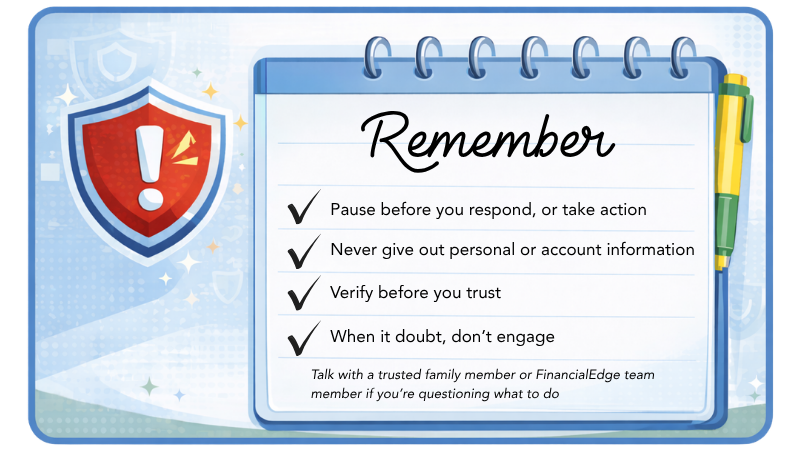
To Protect Yourself from Fraud and Scams:
- Exercise caution with any phone call, text, or email asking for personal information, especially if you haven't initiated contact and don't respond to unsolicited requests for personally identifiable information
- Validate a person's organization by calling them back through an official phone number
- Never share your Social Security number, PIN, Passwords, Medicare ID number, or Driver's license number
- Never click on unsolicited emails, attachments, or links until you verify the request is legitimate
- Monitor your accounts and set up notifications to alert you of potential fraud in ElectronicEdge online banking and on the EdgeMobile App.
- Enable Multi-Factor authentication (MFA)
- Avoid connecting to public Wi-Fi
Creating Secure Passwords:
- Aim for passwords that are between 8 and 64 characters.
- Combine special characters like %, $, and !, along with numbers and both uppercase and lowercase letters.
- Consider using phrases for your passwords:
- Example: Transform "I love my dog" into i7ovemydog!!
- Try not to reuse passwords across different accounts, or use easily accessible information like birthdays, etc.
- Never share your password with anyone.
Online Shopping Safety:
- Only shop from reputable and trusted online retailers or websites.
- Use secure payment options, such as credit cards or platforms like PayPal or Apple Pay.
- If your browser alerts you about a website's security, avoid making any purchases there.
- Be cautious when buying products online that seem too good to be true or are hard to find.
Other Cybersecurity Tips:
From mobile to connected home devices, technology is becoming more intertwined with our lives every day. And while the evolution of technology is moving at the speed of sound, cybercriminals are working just as hard to find ways to compromise technology and disrupt personal and business life.
There are simple ways to protect yourself, your family, and your business from online threats through four key behaviors:
- Use strong passwords and a password manager
- Turn on multifactor authentication
- Recognize and report phishing
- Update Your Software
Cybersecurity Tip Sheets:
- Just Update it Now
- MFA in 2025 Tier List
- My Password Needs to be How Long?
- Password Manager Myth Debunker
- This Email is Making Me FEEL Something
- Raising Digital Citizens Tip Sheet
- Reporting Cybercrimes Tip Sheet
- Secure Our World Using AI Tip Sheet
Report Fraud
Think you've fallen victim to or been targeted by a scam?
- Call or text us at (989) 892-6088 or visit your nearest branch.
- Report fraud to the Federal Trade Commission
- Click on the link below
- Click "Report Now" located at the top of the webpage
- Select the option that most closely resembles the issue
- Fill out the Report Details section
- Fill out the Details about the Company or Individual
- Remember, this is the company or individual with whom your issue stems from
- Fill out the comments section - try to be as specific as possible
- Fill out the Your Details Section
- Hit Submit - That's it!
.png)
Additional Resources
- Federal Trade Commission
- Federal Communications Commission website
- IdentityTheft.gov
- FTC Scam Alerts
- AARP Fraud Watch Network
- FBI Internet Crime Complaint Center (IC3)
- Scam-Tracking Map - Find and Report Scams Near You
- Report Fraud to the AARP Fraud Watch Network Helpline
- Protecting Older Adults from Fraud and Financial Exploitation | Consumer Financial Protection Bureau